


FILE UPLOAD
Before sending us your files, please follow these steps!
› Step 1
 Are your files properly prepared?
90% of delivery delays are caused by files that do not comply with the guidelines provided on each product page.
To find out more about the guidelines to follow: Download our Artwork Preparation Guide
For many products, you will also find templates on the product pages. Look at the bottom of the page, in the "Technical Sheet / Download" tab.
If this information is not available, please contact us.
We will gladly inform and advise you on the file types to send us.
All of our prices are based on a valid, professional, print-ready file being supplied.
› Step 2
 Preparing your upload
1. If you have ordered several products, create subfolders named after each product, containing the files to be printed.
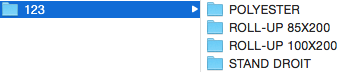
2. Specify front or back in the file names according to your page layout (for products printed double-sided).
3. Compress your folder as a .zip file and rename it with your order number.
› Step 3
 Transferring your .zip folder via WeTransfer
Very important:
Please be sure to state your order number in the WeTransfer comments field.
We receive a large number of files every day, and without it we cannot guarantee our lead times and a good quality of service.
Your transfer will then be rejected and your order put on hold.

›› Click the button to access the file transfer service...
Note: WeTransfer is a free online service as long as the total size of the files sent does not exceed 2 GB.
› Step 4
 We check your files
As soon as they are received, your files are checked by our Prepress Department.
If there is a problem, your order will be put on hold and you will be contacted promptly by email.
We do not print files that do not meet our quality criteria.
If your files are CORRECT, your order can then be sent quickly into production.
Our delivery lead times start from the moment you receive this status by email.