


Sending files
Before we send your files, please follow the steps !
> Step 1
 Are your files well prepared?
90% of delivery delays come from the fact that the received files do not meet our instructions available on each product sheet.
To learn more about the instructions to be respected: Download our PAO guide
You will also find for a large number of products of the templates available on the pages of the products offered by looking at the bottom of the page in the tab "Data sheet / download".
In case of no presence of this information, thanks in advance of Contact us.
We will inform you and you will advise with pleasure on the types of file to transmit us.
All of our prices being Pro valid pro file and ready to print provided.
> Step 2
 Preparation of your shipment
1. If you have multiple ordered products make subdirectories named to product names with inside the files to print.
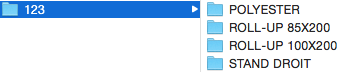
2. Specify in the first or back in file names depending on your paparation (if product in print front / back).
3. Compress your file in .zip and rename it with the number of your order.
> Step 3
 Transferring your file .zip via Wetransfer
Very important:
Thank you in advance to specify your order number in the comments area Wetransfer.
We receive a large number of files every day and without this we can not guarantee our deadlines and a good quality of service.
Your transfer will then be refused and your order waiting.

>> Click the button to access the file transfer service ...
NB: Wetransfer is a free online service as long as the total weight of the sent files does not exceed 2GB.
> Step 4
 We check your files
Upon receipt, your files are checked by our PAO service.
In case of problem, your order will be blocked and you will be contacted quickly by email.
We do not impress files that do not meet our quality criteria.
If your files are correct, your order can then be treated quickly in production.
Our delivery times start from the e-mail receipt of this state.